
Black Friday Storage Deals: SSD, Hard Drive or Cloud Storage — Where Is the Better Value?
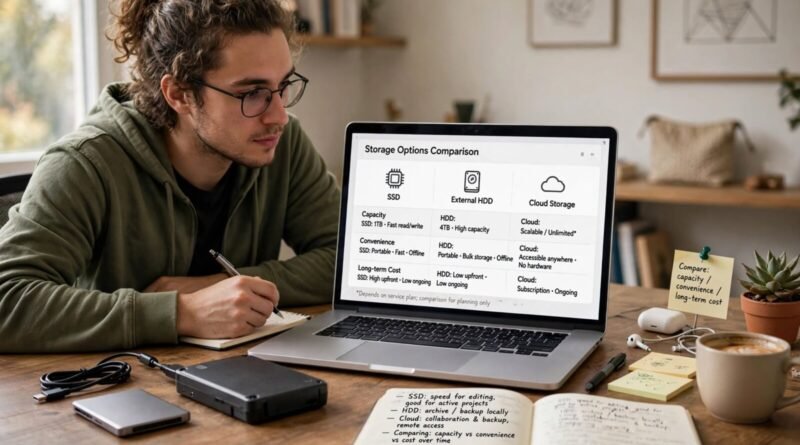
Black Friday storage deals can make very different products look interchangeable. An SSD, a hard drive, and cloud storage all hold files, but they solve different problems. SSDs are fast and convenient for active work. Hard drives can provide large local capacity at a lower cost per terabyte. Cloud storage adds off-site access and synchronization but introduces recurring fees and dependence on an internet connection and provider.
The better value depends on what the storage is for: working files, archive, backup, collaboration, or long-term access.
Table of Contents
Start with the job the storage must do
Do not buy storage capacity before defining the workload. A video editor may need fast local SSD performance for current projects and inexpensive hard drives for archived footage. A family may care more about automatic photo backup and access across devices. A business may need both local copies and off-site protection.
One product rarely solves every storage requirement economically.
SSDs are strongest for active work
Solid-state drives have no moving parts and can provide much faster access than mechanical hard drives. That matters for operating systems, applications, video editing, large photo catalogs, games, and frequently accessed project files.
Buying a very large premium SSD solely for cold archive can be expensive if speed has little value after the files are stored.
Hard drives still make sense for capacity
Mechanical hard drives can offer more capacity per dollar for backups and archives where maximum speed is less important.
They contain moving parts, so handling and failure risk need to be considered. A hard drive should not be treated as the only copy of irreplaceable data.
Cloud storage buys access and off-site location
Cloud services can synchronize files across devices, support sharing, and keep a copy away from your home or office. The trade-off is recurring cost, upload/download time, account dependence, and provider policies.
A one-terabyte cloud plan paid for many years can eventually cost more than a local drive, but it provides services the drive alone does not.
Compare cost over the same time horizon
A one-time hardware price should not be compared with one month of cloud service. Choose a realistic ownership period, such as three or five years.
If a hypothetical 2 TB external drive costs $100 and a 2 TB cloud plan costs $10 per month, three years of cloud service costs $360 under unchanged pricing. The cloud option is more expensive in this simple example but includes remote access and off-site storage.
These figures are illustrative, not current market prices.
Backup is different from storage
Having files on one external drive is storage, not a complete backup strategy. If that drive fails, is stolen, or is damaged with the computer, the data may still be lost.
A common principle is to keep multiple copies with at least one in a different location. The exact implementation depends on the importance and volume of the data.
Creators need working, archive, and backup tiers
Creators often benefit from separating fast project storage from large archives and independent backup. That prevents every terabyte from being purchased at premium SSD prices.
Earnyx’s YouTube production bottlenecks guide is relevant because slow file transfers and full drives can become recurring production friction.
Drive speed needs to match the interface
An extremely fast SSD cannot deliver its full performance through a slow port, cable, enclosure, or older computer interface.
Check USB, Thunderbolt, PCIe, or other interface requirements before paying for performance your system cannot use.
Capacity needs headroom
A drive purchased nearly full on day one provides little room for growth. Estimate current storage use and how quickly it increases.
For video, photography, backups, and games, growth can be much faster than expected. Buying some headroom can reduce the need for another purchase soon.
Cloud upload speed matters
Large cloud backups can take a long time on connections with limited upload capacity. A plan may offer several terabytes, but your internet connection determines how quickly those terabytes can be protected or restored.
Earnyx’s download vs upload speed guide explains why upload performance matters for cloud backups.
Privacy and account security matter in the cloud
Cloud storage moves part of the security responsibility to an online account. Use strong authentication and understand sharing permissions, recovery options, and encryption claims.
For especially sensitive information, organizations may have legal or contractual requirements that influence provider choice.
Local storage has physical risk
Drives can fail, be damaged, stolen, or lost. Keeping every copy in the same room can expose all of them to the same incident.
Off-site backup—cloud or another physical location—can reduce correlated risk.
Black Friday drive deals need exact-model checks
Storage products with similar capacities can differ in endurance, warranty, controller, interface, performance, and intended workload.
The FTC’s Guides Against Deceptive Pricing provide context for verifying that a large advertised markdown reflects a meaningful prior price.
Beware of counterfeit storage
Suspiciously cheap memory cards, USB drives, and SSDs from unknown sellers can misreport capacity or use lower-quality components.
For important data, seller reliability can be worth more than a small additional discount.
Use cost per usable terabyte carefully
Cost per terabyte is helpful only when comparing storage with similar roles. A cheap archive hard drive and a premium editing SSD are not substitutes if the project requires sustained high performance.
Likewise, cloud storage includes services that raw hardware does not.
Example: a mixed setup
A creator might use a 2 TB SSD for active projects, a larger hard drive for completed work, and a cloud or off-site copy for critical documents and selected media.
This layered approach can cost less than putting every file on fast SSDs while providing better resilience than keeping one giant local drive.
Bottom line
SSDs are usually the better value for active work where speed matters. Hard drives can be stronger for large local archives and backups where cost per terabyte matters more. Cloud storage is strongest when off-site protection, synchronization, sharing, and remote access justify a recurring fee.
A Black Friday storage deal should fit a storage strategy rather than replace one. Define whether you need speed, capacity, backup, or access first, then compare the full multi-year cost and reliability of the option that actually solves that job.


